
Download Bevinzey – AI‑Powered Learning Tool for Students and Educators
Introduction & Overview
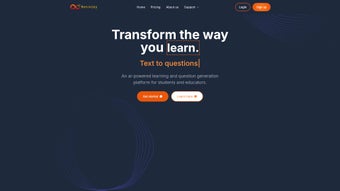
Bevinzey is a web‑based, AI‑driven learning platform that reimagines how students, teachers, and lifelong learners interact with dense educational material. By harnessing cutting‑edge natural language processing, the service can instantly transform any textbook chapter, research article, lecture slide, or even a raw PDF into a curated set of practice questions, concise bullet‑point summaries, and ready‑to‑share study guides. The core promise is simple: eliminate the repetitive, time‑consuming work of manual note‑taking and quiz creation, allowing users to focus on comprehension and critical thinking.
Because Bevinzey operates entirely in the browser, there is no need for heavyweight installations, licensing fees, or periodic updates—just a secure login and an internet connection. Early adopters report measurable improvements in retention rates, test scores, and overall confidence, especially when dealing with fact‑heavy subjects such as biology, chemistry, history, and engineering. While the AI excels with structured, factual content, it can occasionally stumble on highly specialized jargon or creative prose, a limitation that the development team addresses with monthly model refinements.
The platform offers a generous free tier that supports unlimited individual usage, while premium plans unlock advanced classroom analytics, bulk export capabilities, and API access for LMS integration. In short, Bevinzey delivers a fast, secure, and adaptable way to generate adaptive learning resources on the fly, making it an indispensable companion for modern education.
Key Features That Set Bevinzey Apart
- AI‑Generated Question Bank: Upload or paste any text and receive a variety of multiple‑choice, true/false, and short‑answer questions tailored to the material’s difficulty level.
- Automatic Summarization: The engine extracts key points, producing bullet‑point summaries that highlight the most important concepts.
- Custom Study Guide Builder: Combine generated questions, summaries, and your own notes into a printable or shareable PDF study guide.
- Adaptive Difficulty Adjustment: Bevinzey learns from user performance, gradually increasing question complexity to match learner growth.
- Collaboration Mode for Educators: Teachers can create class‑wide question sets, assign them to groups, and track collective progress through an integrated dashboard.
- Cross‑Platform Accessibility: Because it’s web‑based, Bevinzey works on Windows, macOS, Linux, ChromeOS, Android, and iOS browsers without additional software.
- Data Privacy & Security: All uploaded content is encrypted in transit and stored with strict GDPR‑compliant policies, ensuring student data remains confidential.
- Regular Content Updates: The AI model is refreshed monthly, improving language understanding and expanding the library of question templates.
Each of these capabilities is designed to address a specific pain point in the learning workflow. For example, a high‑school biology teacher can paste a dense chapter on cellular respiration, instantly receive a set of differentiated quiz questions, and export a polished study guide for the entire class—all within a single browser tab. Meanwhile, a college researcher preparing for a comprehensive exam can feed a lengthy journal article into the summarizer, receive a concise, high‑level overview, and then test comprehension with AI‑crafted questions that adapt as they improve.
The platform also supports collaborative features such as shared libraries, allowing study groups to co‑author guides and track each member’s progress. Because the service runs entirely in the cloud, performance is independent of local hardware, meaning even modest laptops or tablets can generate high‑quality learning assets in seconds. The combination of automation, adaptability, and cross‑device accessibility makes Bevinzey a truly versatile tool for any educational setting.
Installation, Usage & Compatibility
Getting Started – No Download Required
The “installation” process for Bevinzey is reduced to three effortless steps, reflecting its commitment to frictionless onboarding. First, navigate to the official website at bevinzey.com and click the prominent “Sign Up” button. Second, complete the short registration form, providing a valid email address, a secure password, and optionally your school affiliation to unlock educator‑specific features. Third, confirm your email via the link sent to your inbox; once verified, you are granted immediate access to the full suite of free tools. Because the platform is entirely browser‑based, there is no need to download executables, manage updates, or worry about operating‑system compatibility beyond having a modern web browser.
Operating System Support
Bevinzey runs on any contemporary operating system that supports a recent version of Chrome, Firefox, Edge, or Safari. This includes Windows 10/11, macOS Ventura and later, major Linux distributions (Ubuntu, Fedora, Debian, etc.), ChromeOS, Android 9 and up, as well as iOS 14 and newer. The service leverages cloud‑side processing, so the heavy AI inference occurs on Bevinzey’s servers; the client device only needs to render the user interface and transmit text data securely. As a result, even low‑end devices such as Chromebooks or budget Android tablets can generate full‑featured question banks without lag, provided they have a stable broadband connection.
Step‑by‑Step Usage Example
To illustrate a typical workflow for a university student, consider the following five‑step process:
- Upload Content: Drag a PDF of a recent research article into the “Create Questions” pane or paste plain‑text from a lecture slide.
- Select Output Type: Choose “Multiple Choice” and set the desired difficulty (Easy, Medium, Hard). Optional toggles let you request true/false or short‑answer formats as well.
- Generate: Click “Generate.” Within 5–10 seconds, Bevinzey presents a list of ten questions, each accompanied by answer keys, explanations, and confidence scores.
- Refine & Export: Edit any question for phrasing or specificity, then click “Export to PDF” or “Save to My Library” for later review. You can also bundle the questions with an automatically generated summary to create a comprehensive study packet.
- Study Mode: Use the built‑in flashcard view to quiz yourself, with real‑time tracking of correct/incorrect responses. The system records your performance and automatically adjusts future question difficulty.
Educators follow a similar flow but gain extra capabilities: after generating a question set, they can assign it to a specific class section, set a due date, and view aggregate performance dashboards that highlight common misconceptions. All data remains within the secure Bevinzey environment, and educators can export CSV reports for integration with existing grade books.
Pros & Cons – Balanced Review, FAQ, and Final Verdict
Pros
- Instant AI‑generated questions eliminate hours of manual quiz creation.
- Summarization converts long texts into bite‑size study notes in seconds.
- Web‑only delivery ensures zero installation hassle and true cross‑platform compatibility.
- Adaptive difficulty keeps learners challenged without causing frustration.
- Robust privacy controls comply with GDPR and FERPA, protecting student data.
- Generous free tier provides ample resources for individual learners; premium plans add analytics, bulk export, and API access.
Cons
- Performance can dip when processing highly technical jargon or literary prose.
- Reliance on a stable internet connection may limit use in low‑bandwidth environments.
- Advanced features such as API integration and bulk processing require a paid subscription.
- Limited offline functionality compared to native desktop study apps.
Frequently Asked Questions
Is Bevinzey completely free to use?
Bevinzey offers a robust free tier that includes unlimited question generation for individual users, summarization, and study guide creation. Premium subscriptions unlock additional features such as bulk processing, API access, and advanced classroom analytics.Can I use Bevinzey on a mobile device?
Yes. Because the platform is browser‑based, it works on Android and iOS browsers. The responsive design ensures that all tools—question generation, summarization, and study guide export—are fully functional on smartphones and tablets.How does Bevinzey protect my uploaded content?
All data is encrypted using TLS 1.3 during transmission and stored on secure servers that comply with GDPR and FERPA standards. Users can also opt to delete their content permanently after each session.What types of texts work best with Bevinzey?
The AI excels with structured, fact‑based material such as textbooks, scientific articles, lecture notes, and curriculum guides. While it can handle narrative text, highly specialized jargon or poetic language may produce less accurate questions.Is there an API for integrating Bevinzey into my LMS?
Yes, premium subscribers gain access to a RESTful API that allows seamless integration with popular learning management systems (Moodle, Canvas, Blackboard). The API supports batch uploads, automated question retrieval, and result reporting.Conclusion & Call to Action
Bevinzey stands out as a practical, AI‑driven companion for anyone looking to streamline the study process. Its blend of question generation, summarization, and collaborative tools makes it a valuable addition to both individual study routines and classroom workflows. By eliminating the manual grunt work of note‑taking and quiz creation, Bevinzey frees up valuable time for deeper learning and critical thinking. Whether you’re a high‑school student preparing for finals, a college researcher needing quick study aids, or an educator seeking to enrich lesson plans, Bevinzey offers a secure, cross‑platform solution that adapts to your needs.
Ready to experience smarter studying? Sign up for a free account today and start generating AI‑powered learning resources in seconds. When you’re ready to unlock advanced classroom analytics, bulk export, and API integration, simply upgrade to a premium plan. Transform the way you learn and teach—download Bevinzey now and join the growing community of educators and students who are already benefiting from AI‑enhanced education.



.png)



